
INPUT
YOUR SELFIE HERE
Your Selfie
One clear photo of one person. It becomes the recognizable driver seated inside the car.
THE TRAFFIC ENDS HERE
Your face. Your roadster. A whole new escape.
Upload a selfie. Take the driver’s seat. Turn the flying Roadster trend into your own cinematic AI video — no prompts or editing needed.
NOW IT’S YOUR TURN
One person. Clear face. Good lighting. That’s all you need.
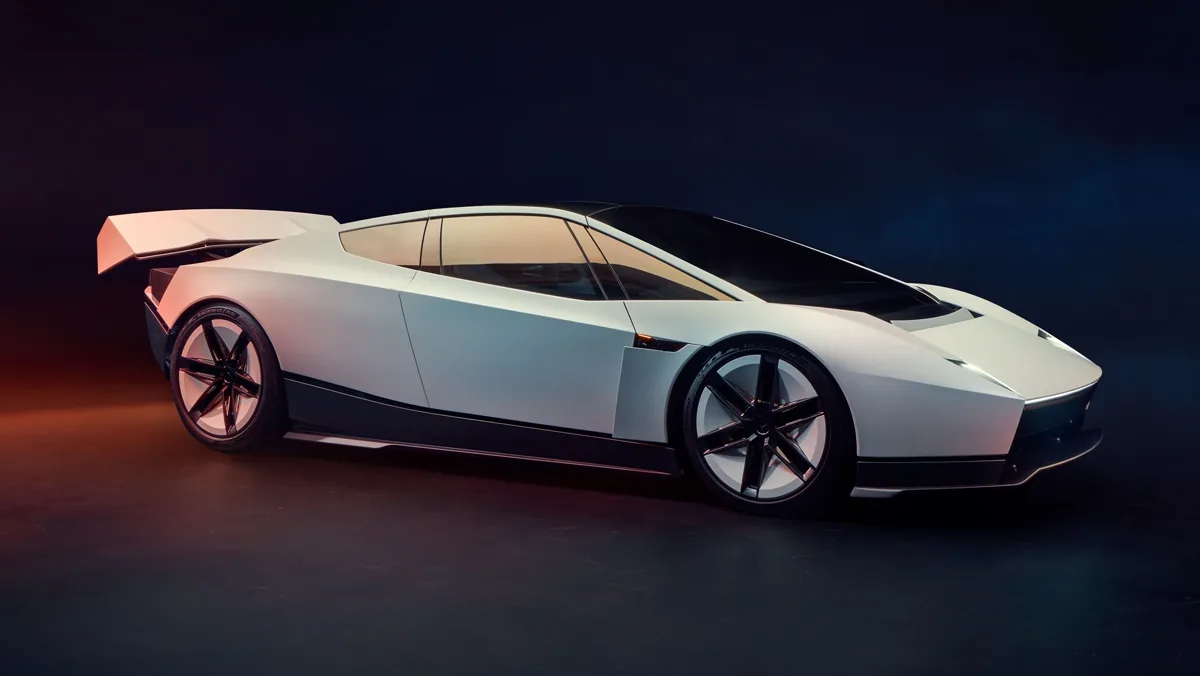
One selfie. Zero prompts. All imagination.
AI-GENERATEDWHAT YOU GET
Every video is assembled from exactly two inputs. Your uploaded photo defines the driver, our locked roadster reference defines the car, and the template merges them into one continuous traffic-escape shot.
INPUT
One clear photo of one person. It becomes the recognizable driver seated inside the car.
INPUT
The same low wedge-shaped roadster in every video — locked body, paint, wheels and windows.
OUTPUT
 5s · 768P · MP4
A short MP4 with a five-second target and adaptive framing. Preview the result to check the driver, scene and motion before downloading.
The template follows this scene order. Timings are the target pacing — not a second-by-second guarantee.
The driver sits in the roadster among stationary cars, face clearly visible.
One deliberate press activates the propulsion system and its lights begin to glow.
Thrusters push the car up and above the traffic while the body stays unchanged.
The roadster accelerates forward above the road as the camera tracks it.
THE FIXED TEMPLATE
A low-slung sports car. A city at a standstill. Then, takeoff. Our fixed traffic-escape template prepares the scene so you can focus on the person in the driver’s seat: you.
Create your videoHOW IT WORKS
Choose a JPEG, PNG or WebP image up to 10 MB, with one visible face and enough detail to identify the person. Use your own photo or a portrait you have permission to use. Check the thumbnail before continuing; you can replace a dim, blurry or heavily filtered photo. A separate car photograph is not required for this template.
Roadster Traffic Escape provides the vehicle reference and scene direction. Read the current credit price in the generator, sign in, and confirm before starting a paid job. The service submits your image for AI processing and shows the job’s actual state. Queue and processing times vary, so the status tells you what is happening without inventing a completion percentage.
When processing succeeds, watch the private video preview and download the MP4. Check the face, car shape and takeoff sequence before using the clip. A new generation is a separate attempt and may produce a different result. Keep a downloaded copy of anything you want to retain, and check the current file-storage information in the Privacy Policy.
SCENE EXAMPLES
This is the traffic-escape scene the template recreates, shown as project reference footage for motion guidance.
The reference shows gridlock, a button press, lift-off and flight above the traffic. Generation follows this intended sequence; identity, timing and details can vary.
Licensed reference footage for scene direction — not a personalized customer result. Real selfie-to-video generations appear here once the service ships.
Roadster Rocket Launch — a standing start, then a vertical climb.
Roadster Night Flight — the same escape under city lights.
Planned templates. Each ships only after its own reference material, prompts and real generations are verified.
FLYING ROADSTER AI
Flying Roadster AI turns a clear portrait into a fictional flying-car scene built around the Roadster Traffic Escape template. The idea is simple: you are in the driver’s seat, traffic has stopped, and a futuristic roadster lifts above the road. Upload one selfie to start. The scene instructions and vehicle reference are already prepared, so you do not need to write a prompt or arrange a timeline.
This page shows reference footage supplied for the project to explain the intended look and action. It is labeled as reference material, rather than presented as proof of a personalized result. Your completed video will be a new AI generation. Facial likeness, vehicle details and camera movement can vary. Review your own preview before downloading or sharing it.
The MiniMax template targets approximately five seconds at 768P, with framing chosen automatically from the references. That framing suits a personal car meme, an imagined traffic escape or a short creative post. The sequence is a creative target; it does not promise a particular action at an exact second. This is independent fictional entertainment and is not an official Tesla product or a demonstration of a real vehicle’s capabilities.
KEY FEATURES
The homepage focuses on making a flying Roadster video from a selfie. A fixed scene keeps the main task clear: add a person, review the price, generate and download. It avoids asking you to choose a general-purpose video model, build a complex prompt or supply a car image before you can try the core experience.
The template aims for an understandable beginning, takeoff and flight over traffic. Prepared vehicle and motion references guide the scene, while your photo supplies the driver reference. These inputs help define the request; they do not guarantee perfect identity preservation, identical bodywork in every frame or an exact recreation of another creator’s clip.
Adaptive framing lets the model choose a canvas from the reference materials; a portrait reference does not guarantee a vertical result. Think of it as a brief visual punchline, rather than a full driving film. Watch the whole result before posting: interface overlays, captions and crop rules on your chosen social platform can cover important details near the edges.
Completed jobs offer a private preview and an MP4 download instead of automatically publishing your likeness to a public gallery. Your upload is processed by the generation service, including third-party fal.ai processing. Read the privacy and credit policies before submitting a portrait, and use the contact page if a task or a download needs attention.
PHOTO TIPS
Start with an evenly lit portrait where your eyes, nose and mouth are visible. Avoid very small faces, heavy motion blur, sunglasses covering the eyes, or strong beauty filters that change your appearance. These are practical preparation suggestions, not tested guarantees. A clearer reference still cannot eliminate identity changes in an AI-generated moving scene.
A single-person portrait makes it clearer who should occupy the driver’s seat. Group pictures, overlapping faces and extreme side angles introduce ambiguity. If your original photo contains other people, choose a different image or crop it yourself before uploading. The standard tool is a single-driver experience; it does not provide a multi-person casting workflow.
A strong opening image does not prove that the rest of an AI video is consistent. Play the preview through and look for changes in facial features, wheels, windows and body shape. Check whether the takeoff reads clearly. Save the clip only if it fits your intended use, and label the fictional scene appropriately when you share it.
ONE-TIME PACKS
One-time packs, no subscription. Each pack is a fixed number of video generations, and the studio confirms the cost before you generate.
First flight
Try your first traffic escape.
1 video generation
No subscription · Valid for 1 year
Creator pack
Room for a few different takes.
3 video generations
No subscription · Valid for 1 year
Explorer pack
More ideas. More possibilities.
5 video generations
No subscription · Valid for 1 year
One generation equals one video attempt with the current template. Failed jobs return it. The studio shows the exact cost before you start.
Flying Roadster AI is an independent online generator for a specific creative task: placing a person from a selfie into a fictional Roadster-style traffic-escape video. It uses a prepared vehicle reference and scene instructions rather than asking you to create a full video prompt. The output is AI-generated entertainment, not real driving footage. The name describes this tool and scene; it does not imply an affiliation with Tesla, TikTok or a vehicle manufacturer.
Open the generator on this page, add a clear single-person portrait, and review the selected Roadster Traffic Escape scene. The form shows the current credit requirement before you confirm generation. After you sign in and start the task, follow the reported status until the video is ready. You can then watch the private preview and download the MP4. You do not need to write prompts, upload a reference video or perform manual video editing in the standard flow.
Your selfie provides an identity reference, but exact facial likeness is not guaranteed. The face can change when the camera angle, lighting or movement changes, and small features may drift between frames. Use a sharp photo with one clearly visible face, then judge the completed video yourself. This tool is intended for a playful visual scene, not identity verification, evidence of an event, or a claim that the person actually drove or flew a car.
No. The standard template already includes a fixed Roadster-style vehicle reference, so the required input is the person’s photo. Uploading your own vehicle is a different task and is not part of this homepage’s main workflow. Do not expect a selfie generation to reproduce a particular car you own, a specific trim or a manufacturer’s exact design. The result is a fictional interpretation guided by the configured template and the AI model’s capabilities.
No. The scene is inspired by the idea of a roadster lifting above traffic, but each output is newly generated and may differ in timing, camera position and details. Reference footage on this page explains the intended style and is labeled separately from personal outputs. You should not assume it was made by this generator. The standard flow does not download a TikTok creator’s original clip or give you permission to copy their footage, music or likeness.
The MiniMax template requests five seconds at 768P with adaptive framing and offers an MP4 download after successful processing. The generator’s current settings and the completed file are the definitive references for your job. A storyboard describes the desired order of events, not a guarantee that a button press or takeoff occurs at an exact second. Resolution, audio, fine details and motion depend on the configured generation service; do not infer an unavailable option from the reference footage.
There is no fixed completion-time promise. The provider’s queue, image preparation, video processing and file delivery can each affect the wait. Follow the task state shown by the generator rather than treating an animation as a real progress estimate. Jobs are processed on the server after submission; reopening your task lets you check its state. If a job remains pending unexpectedly, keep its job identifier and contact support instead of repeatedly creating paid attempts.
Use the current price displayed in the generator and on the pricing page. A paid generation requires enough credits, and the job’s credit cost is shown before you confirm. Do not assume that a free trial, unlimited usage, a subscription benefit or a particular discount is included unless the checkout explicitly offers it. A repeat generation is a new AI request with its own displayed cost. Review both the credit requirement and the payment terms before buying a pack.
A job recorded as failed returns the credits reserved for that generation. Check the job state and your credit balance before trying again; submitting a second request while the first is still processing creates a separate attempt. A video that completes but contains a visual detail you dislike is not automatically the same as a technical failure. For a missing credit return, provide the job identifier through the contact page so the transaction and task can be investigated together.
Uploads and personal results are private by default and are used to carry out your requested generation. The processing flow involves third-party fal.ai services, so private does not mean that the photo stays entirely inside your browser. Check the Privacy Policy for the current storage and deletion details. A proposed thirty-day retention period is not a promise until storage lifecycle controls are configured and the published policy confirms it. Download files you want to keep and contact the operator for deletion questions.
You can download a completed MP4 for use in compatible editing and publishing workflows. Before posting, check your rights to the portrait and any additional music, logos or footage you add, together with the destination platform’s current rules. Identify the scene as AI-generated where required and avoid presenting the fictional flight as a real event. This page does not grant blanket commercial rights, promise platform approval, or guarantee that a post will attract views or become viral.
This is an independent creative tool and is not affiliated with, endorsed by or sponsored by Tesla. Its generated scenes are fictional. The project’s supplied reference videos demonstrate the look and sequence the template aims toward; they are not evidence of a completed customer job, a measured success rate or the performance of the current model configuration. Only a clearly labeled output from an actual generation can demonstrate that specific attempt. Model quality and commercial-use rights must be assessed separately.
AI output varies: facial likeness, vehicle geometry, motion continuity and scene timing are not guaranteed.
Reference footage illustrates the scene direction. Your personalized video is a new generation; identical motion, camera angles and facial likeness are not guaranteed.
Private generation uses third-party fal.ai processing. Review the current privacy, retention and credit policies before uploading.
Flying Roadster AI
We’re building a focused tool for an imaginative moment: you, a futuristic roadster and a way above the traffic. This is fictional AI entertainment, not real driving footage. We are not affiliated with Tesla, TikTok or any car manufacturer.
Your next flying Roadster video starts with a selfie.
Create your video